

Membership tiers provide different access and benefits. Primarily, they offer different amounts of access each week.
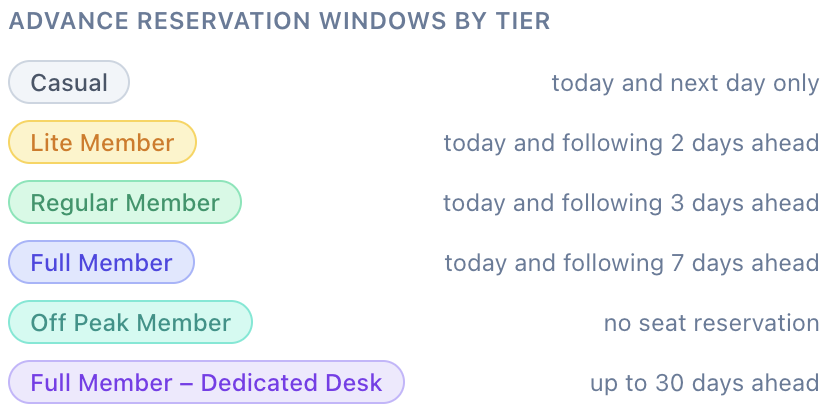
On the Desk Reservations app, Full Members enjoy a full week of advance booking, while lower tiers have less forward booking opportunity. This means high tiers have a better chance of securing the desk they prefer.
Also, Full Members can add-on the Dedicated Desk option, which means their window desk is always theirs for a full month, so they can leave items behind in a lockable cabinet and leave their own peripherals on the their desk.
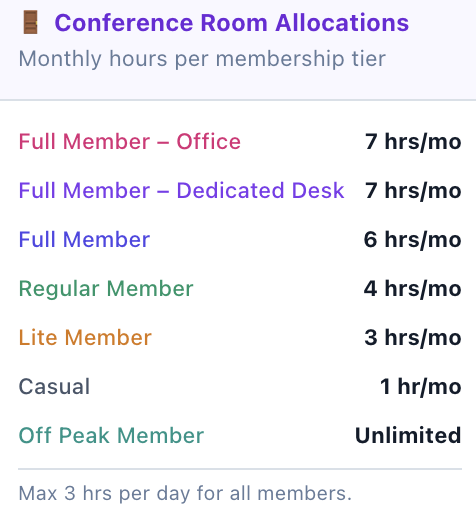
Also, our Conference Room is now booked on a credits basis. Again, the different memberships provide different monthly credits. You can book the meeting room directly from the Desk Reservations app, and purchase more monthly credits if needed.
To see all the different features of the membership plans in detail, check out SkillionSpaces.com.
To change your membership, you will need to follow these quick steps:
Find your original Membership Subscription Confirmation email from Square (our payment gateway)
Hit “Manage Subscription” and then “Cancel Subscription” (your membership will remain current until the end of your payment month)
Go to SkillionSpaces.com and find the new membership plan you like, and subscribe. You can do this at the end of your payment month so that you aren’t losing credit from your current subscription.
Please note that by changing tiers, you may not be able to revert to your original tier if it is no longer available, especially as some older membership plans are no longer available.